SPREADSHEET OR WORKOUT TRACKER
WORKOUT TRACKER · PRE-LAUNCH
Workout Tracker App vs Spreadsheet: Which Should You Use?
A spreadsheet can track your workouts.
But how convenient is it when you're actually training?
Excel and Google Sheets give you flexibility, custom formulas and control over your data.
A dedicated workout tracker can make it easier to record sets, review previous performances and keep exercise history close during your workout.
The best choice depends on how you train and what you want from your workout log.
IronYou is currently pre-launch. The interactive demo uses illustrative sample data.
THE SHORT ANSWER
Is a Workout Tracking App Better Than a Spreadsheet?
Neither option is automatically better.
A spreadsheet is a great choice if you want complete control over your training data, custom formulas and personalized tracking.
A dedicated workout tracking app may be more convenient when you want to log sets during training, review previous performances and keep your exercise history organized.
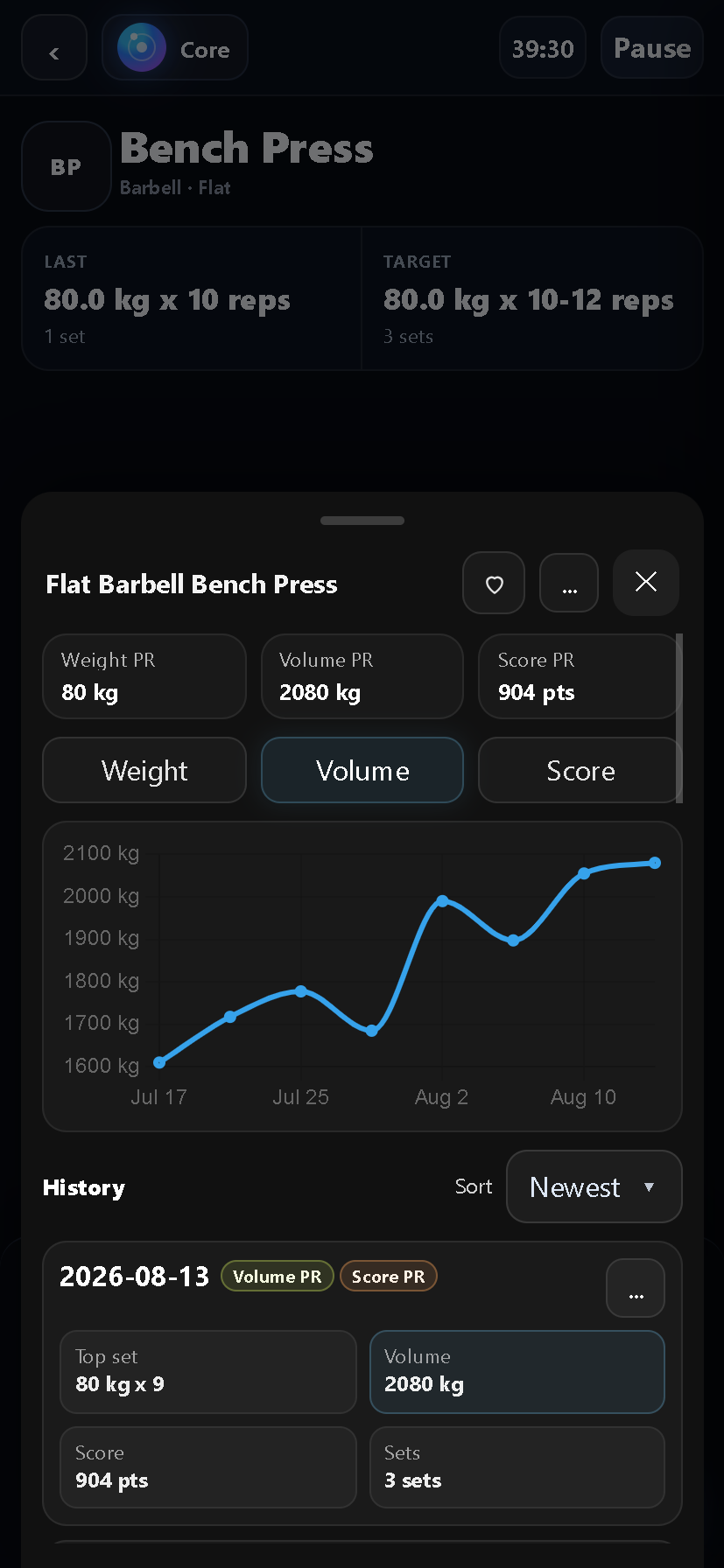
IronYou combines workout logging with previous-performance context, exercise variations and progress tracking.
TWO TRACKING METHODS
The Same Workout. Two Ways to Track It.
Imagine you're performing three sets of Bench Press.
Your workout looks like this:
Tracking With a Spreadsheet
In Excel or Google Sheets, you can create a table with your exercises, sets, weights and repetitions.
You can add formulas, charts and custom fields to analyze your training.
If your spreadsheet is designed well, it can also show previous workout data and calculate performance changes.
The trade-off is that you need to build and maintain that structure yourself.
| Exercise | Set | Weight | Reps |
|---|---|---|---|
| Bench Press | 1 | 60 kg | 10 |
| Bench Press | 2 | 60 kg | 9 |
| Bench Press | 3 | 60 kg | 8 |
Tracking With IronYou
With IronYou, you select the exercise you're performing and record your sets inside a dedicated workout interface.
Your previous performance and today's target can appear alongside the current exercise.
After recording a set, you can review the result and available comparison data without manually navigating a spreadsheet.
IronYou keeps your exercise history connected to the movements you track.
Both methods record your workout.
The difference is how easily you can use that information during your next session.
FEATURE COMPARISON
Workout Tracking App vs Spreadsheet: Feature Comparison.
A spreadsheet offers flexibility. A workout tracker offers a purpose-built training interface. Here's how they compare for common tasks.
| Feature | Spreadsheet | IronYou |
|---|---|---|
| Track sets, reps and weights | Yes. You choose how the data is organized. | Yes. Record sets directly within your workout. |
| Custom formulas and calculations | Create your own formulas and calculations. | Use the statistics and calculations supported by the application. |
| Previous performance during logging | Possible with your own layout, formulas or lookup system. | Previous performance can appear beside today's exercise logging. |
| Exercise-specific history | Possible when exercises and records are organized consistently. | Exercise history is connected to recorded movements. |
| Exercise variations | Create your own fields for grip, angle, equipment and variations. | Select supported exercise variations when recording your workouts. |
| Progress charts and statistics | Build custom charts and calculations using your recorded data. | Review supported exercise statistics, personal records and progress trends. |
| Fully customizable tracking fields | Create nearly any structure your spreadsheet supports. | Customization is limited to the features supported by the application. |
Spreadsheet capabilities depend on how the sheet is configured. IronYou is pre-launch. The table describes its implemented tracking capabilities, not a publicly available download.
SPREADSHEET STRENGTHS
When a Spreadsheet Is the Better Choice.
Stick with a spreadsheet if you enjoy building custom training dashboards, need specialized formulas or already have a tracking system that works well for you.
Spreadsheets can be especially useful when you want complete control over the structure of your data.
You can create custom fields, combine information from different sources and design calculations around your own training methods.
You don't need to switch tools just because a workout app exists.
PURPOSE-BUILT WORKOUT LOGGING
When a Workout Tracker Fits Better.
If you regularly train at the gym, you may want your workout history available without manually organizing a spreadsheet.
IronYou keeps previous performances, today's targets and set comparisons within your workout.
You can also track specific exercise variations, helping you keep performances associated with the movements you actually trained.
Instead of designing a tracking system, you can focus on recording your training and reviewing what changed.
A FLEXIBLE WORKFLOW
You Don't Have to Choose Only One.
A spreadsheet and a workout tracker can serve different purposes.
You might use a spreadsheet to plan your training, organize custom calculations or maintain a personal dashboard.
Then use a dedicated workout app to log sets and review exercise history during your sessions.
Choose the workflow that helps you track your training consistently.
The best system is one you can actually maintain.
COMMON QUESTIONS
Common Questions About Workout Tracking.
Is Excel good enough for tracking workouts?
Yes. Excel and Google Sheets can track exercises, sets, repetitions, weights and workout history. A well-organized spreadsheet can also calculate progress and display charts. The main trade-off is that you must create and maintain your own tracking system.
Can a spreadsheet track progressive overload?
Yes. By recording exercises, weights, repetitions and sets over time, you can compare performances and track progressive overload. Spreadsheets can also use formulas to calculate changes across sessions.
What are the advantages of a workout tracking app?
A dedicated workout tracker provides an interface designed for logging training sessions. Depending on the app, it may offer exercise selection, previous-performance context, workout history, personal records and progress statistics without requiring you to build those features yourself.
Can I try IronYou before signing up?
Yes. IronYou offers an interactive workout demo using illustrative sample data. The full product is currently pre-launch. You can join Early Access to receive updates about future availability.
IRONYOU IS PRE-LAUNCH
Your Workout Log Should Work for You.
Whether you're moving from a spreadsheet or looking for a better way to track your sessions, IronYou is being built to keep your training history useful. Explore the interactive demo and join Early Access to hear when IronYou becomes available.
We'll keep you posted as IronYou gets closer.